
A nightly batch pipeline answers “what happened yesterday?” A fleet manager also needs to know what is happening right now. A tyre is losing pressure on the highway, a tank just dropped 40 litres in a parking lot at 2 a.m., or an engine fault code appeared ten minutes ago.
This post walks through a platform built for both: real-time alerts and historical analytics, stored in one database. The design pieces are:
• AWS IoT Core for secure device connectivity
• Lambda for event processing
• TimescaleDB (time-series PostgreSQL) as the single store for telemetry and business data
• An AI layer for anomaly detection and natural-language questions
• Web (SPA), Android and iOS apps on top
This is a reference architecture with working code patterns, not a benchmark report. Where cost or performance depends on your fleet size, I say what to measure instead of quoting numbers.
The architecture
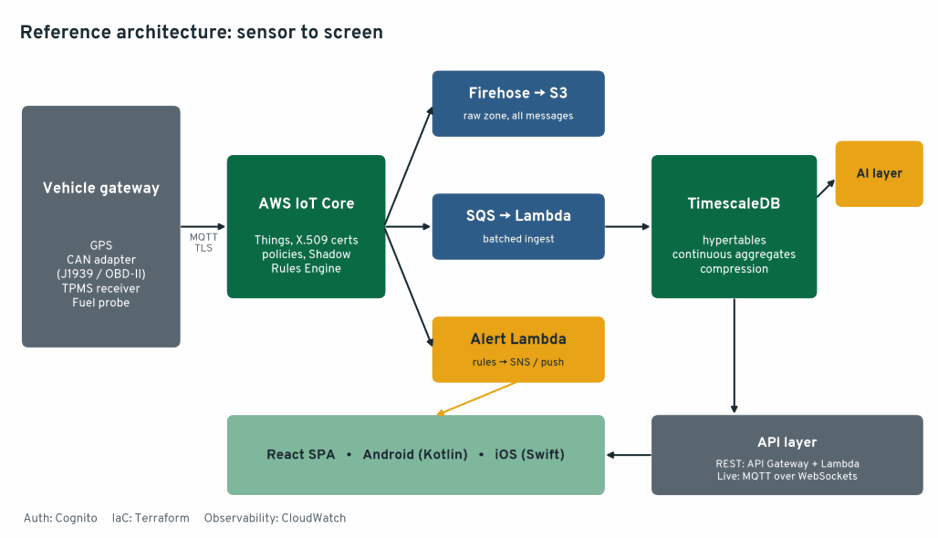
Three ideas carry the whole design:
1. Every message lands in S3 untouched. The database can be rebuilt from the raw zone if a bug corrupts it.
2. Time-series and relational data live in one PostgreSQL database. Vehicles, drivers, trips and work orders sit next to the sensor data, so a single SQL join answers “which driver had the most harsh braking on vehicles with open brake work orders?”
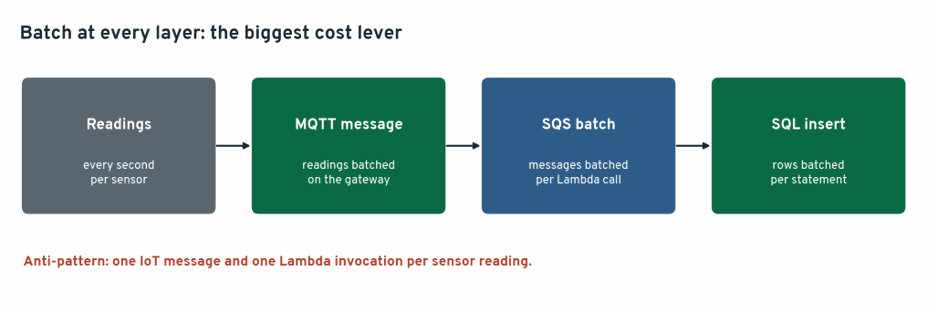
3. Ingestion is batched. Devices batch readings into messages, SQS batches messages into Lambda invocations, and Lambda batches rows into inserts. One Lambda per sensor reading is the most common cost mistake in IoT on AWS.
1. The vehicle: four sensor families
A telematics gateway in the vehicle reads the sensors and publishes to MQTT. Each family has its own shape and quirks.
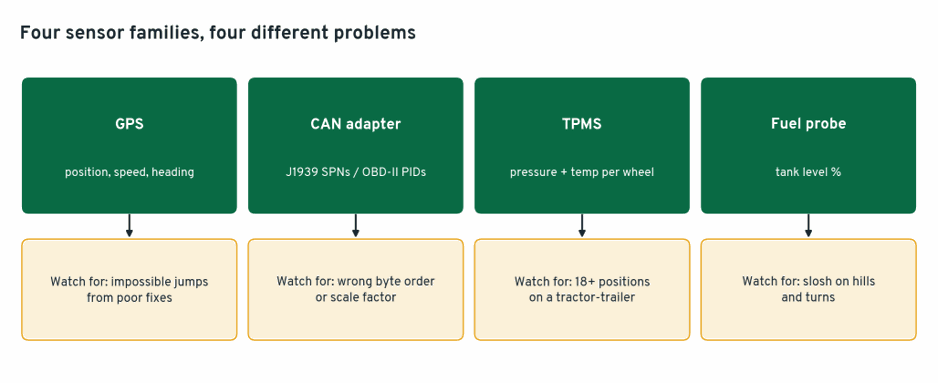
GPS. Position, speed, heading and satellite count. Watch for impossible jumps, since a poor fix can put a truck 3 km off the road for one reading.
CAN adapter. Heavy trucks speak SAE J1939, and light vehicles expose OBD-II PIDs. Decode on the gateway and publish engineering values, not raw frames. For example, J1939 engine speed (SPN 190) sits in bytes 4–5 of PGN 61444 (EEC1), little-endian, at 0.125 rpm per bit:
def decode_engine_speed(data: bytes) -> float | None:
raw = int.from_bytes(data[3:5], "little") # bytes 4–5, 1-indexed
return None if raw >= 0xFAFF else raw * 0.125 # 0xFB00+ = error/not available
The same approach covers wheel-based speed (SPN 84), coolant temperature (SPN 110), and active fault codes from DM1 messages.
TPMS. Per-wheel pressure and temperature, usually from an RF or BLE receiver. A 6x4 tractor with trailer has 18 or more positions, so wheel position is part of the key.
Fuel sensor. A capacitive probe reports tank level. The signal is noisy, because fuel sloshes on every turn and hill, so smoothing and a “vehicle stationary” condition matter before you call anything theft.
Batch readings into one message per sensor family every few seconds:
{
"vehicle_id": "VH-0192",
"sensor": "tpms",
"ts": "2026–09–18T09:14:22Z",
"readings": [
{"pos": "L1", "kpa": 758, "temp_c": 41},
{"pos": "R1", "kpa": 761, "temp_c": 40},
{"pos": "L2O", "kpa": 612, "temp_c": 47}
]
}
Topic design: fleet/{vehicle_id}/{sensor}, e.g. fleet/VH-0192/tpms. The topic encodes who and what, and the Rules Engine can route on it.
2. AWS IoT Core: Things, certificates and policies
Each vehicle gateway is registered as a Thing with its own X.509 certificate. The gateway connects with MQTT over TLS, and there are no shared passwords anywhere.
The IoT policy uses a policy variable so a device can only connect as itself and only publish to its own topics. A compromised truck cannot impersonate the rest of the fleet:
{
"Version": "2012–10–17",
"Statement": [
{ "Effect": "Allow", "Action": "iot:Connect",
"Resource": "arn:aws:iot:ap-south-1:123456789012:client/${iot:Connection.Thing.ThingName}" },
{ "Effect": "Allow", "Action": "iot:Publish",
"Resource": "arn:aws:iot:ap-south-1:123456789012:topic/fleet/${iot:Connection.Thing.ThingName}/*" }
]
}
Three IoT Core features are worth using from day one:
• Fleet provisioning by claim. Gateways ship with a claim certificate and exchange it for a unique certificate on first boot, so you don’t install certificates by hand on 500 trucks.
• Device Shadow. Stores desired and reported configuration, such as reporting interval or firmware version, even while a truck is out of coverage.
• Basic Ingest. Publishing to the $aws/rules/<rule-name>/… prefix sends messages straight to a rule, skipping the message broker’s messaging charge.
The Rules Engine routes messages with SQL:
SELECT *, timestamp() AS received_at FROM 'fleet/+/+'The received_at field matters: device clocks drift, and storing both device time and server time lets you detect it.
3. The raw zone: every message to S3
One rule action sends everything to Amazon Data Firehose, which buffers and compresses messages and writes batched files to S3, partitioned by date.
Don’t use the IoT rule’s direct S3 action for high-volume telemetry. It writes one object per message, which gives you millions of tiny files that are slow and expensive to query. Firehose exists to prevent exactly that.
The raw zone is your insurance. Replay it to backfill a new table, reprocess after fixing a decoder bug, or train models on history.
4. Ingestion Lambda: SQS in, batched inserts out
A second rule action sends messages to an SQS queue, and Lambda consumes the queue in batches. This buys three things: batching, back-pressure when the database is slow, and a dead-letter queue for messages that fail.
import json, os, psycopg2
from psycopg2.extras import execute_values
conn = None # reused across warm invocations
def get_conn():
global conn
if conn is None or conn.closed:
conn = psycopg2.connect(os.environ["TSDB_DSN"], connect_timeout=5)
return conn
def handler(event, context):
rows = []
for rec in event["Records"]:
msg = json.loads(rec["body"])
if msg["sensor"] != "tpms":
continue
for r in msg["readings"]:
rows.append((msg["ts"], msg["vehicle_id"], r["pos"], r["kpa"], r["temp_c"]))
if rows:
c = get_conn()
with c, c.cursor() as cur:
execute_values(cur, """
INSERT INTO tpms (time, vehicle_id, position, pressure_kpa, temp_c)
VALUES %s ON CONFLICT DO NOTHING""", rows)
Two details make this safe:
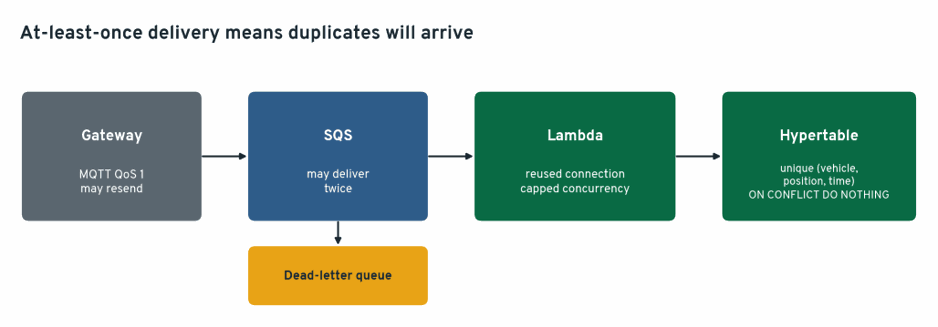
• Idempotent inserts. MQTT QoS 1 and SQS both deliver at least once, so duplicates will arrive. A unique index plus ON CONFLICT DO NOTHING makes a retry harmless.
• Connection reuse and pooling. Hundreds of concurrent Lambdas each opening a connection will exhaust PostgreSQL. Reuse the connection across warm invocations, cap Lambda concurrency on the queue, and put a pooler (PgBouncer or your provider’s built-in pooler) in front of the database.
In production I’d route each sensor family to its own queue and Lambda, so a burst of GPS traffic can’t delay a TPMS alert.
5. TimescaleDB: time-series inside PostgreSQL
TimescaleDB is a PostgreSQL extension. You keep full SQL, joins, foreign keys and the PostgreSQL ecosystem, and gain automatic time partitioning, columnar compression and incrementally maintained rollups.
Hosting note: Amazon RDS for PostgreSQL does not offer the TimescaleDB extension. Your options are Timescale’s managed cloud (the company now operates as TigerData, running on AWS), or self-managed PostgreSQL with TimescaleDB on EC2. Check current offerings before deciding.
Hypertables. A hypertable looks like a normal table but is automatically split into time chunks:
CREATE TABLE tpms (
time TIMESTAMPTZ NOT NULL,
vehicle_id TEXT NOT NULL REFERENCES vehicles(id),
position TEXT NOT NULL,
pressure_kpa SMALLINT,
temp_c SMALLINT
);
SELECT create_hypertable('tpms', by_range('time'));
CREATE UNIQUE INDEX ON tpms (vehicle_id, position, time);
Gotcha: any unique index on a hypertable must include the time column. Plan your idempotency keys around that.
Use one hypertable per sensor family (gps, can_signals, tpms, fuel, dtc_events) rather than one giant generic table. Each has different columns, rates and retention needs.
Continuous aggregates. Dashboards should never scan raw pings. A continuous aggregate is a materialized view that TimescaleDB keeps up to date incrementally:
CREATE MATERIALIZED VIEW fuel_15m
WITH (timescaledb.continuous) AS
SELECT time_bucket('15 minutes', time) AS bucket,
vehicle_id,
avg(level_pct) AS avg_level,
min(level_pct) AS min_level,
max(level_pct) AS max_level,
bool_or(ignition) AS ignition_on
FROM fuel
GROUP BY bucket, vehicle_id;
SELECT add_continuous_aggregate_policy('fuel_15m',
start_offset => INTERVAL '3 hours',
end_offset => INTERVAL '15 minutes',
schedule_interval => INTERVAL '15 minutes');
The start_offset window matters for fleets. Trucks go out of coverage and upload hours of buffered data later, and the refresh window must reach back far enough to include those late readings.
Compression and retention.
ALTER TABLE gps SET (
timescaledb.compress,
timescaledb.compress_segmentby = 'vehicle_id',
timescaledb.compress_orderby = 'time DESC'
);
SELECT add_compression_policy('gps', INTERVAL '7 days');
SELECT add_retention_policy('gps', INTERVAL '13 months');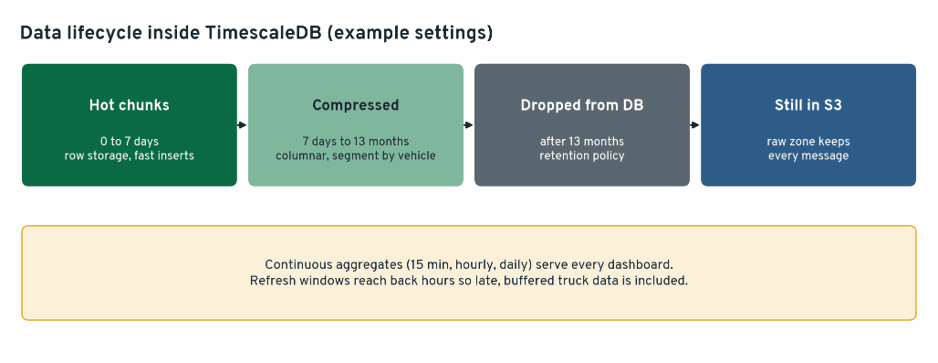
Segmenting by vehicle_id keeps each vehicle’s history together, which is exactly how fleet queries read it. Raw data older than the retention window is dropped from the database but still exists in S3. Newer TimescaleDB versions rename compression to “columnstore” with equivalent functions, so match the syntax to your version.
6. Real-time alerts
A third rule action invokes an alert Lambda directly for the few conditions that can’t wait for a batch:
• TPMS: pressure below a threshold of the cold placard value, or a rapid loss within minutes, which suggests a puncture rather than a slow leak.
• Fuel: a sharp level drop while ignition is off and the vehicle is stationary.
• CAN: a new active fault code (DM1) on a critical system, or coolant temperature above limit.
- GPS: geofence exit, or speeding against the road’s limit.
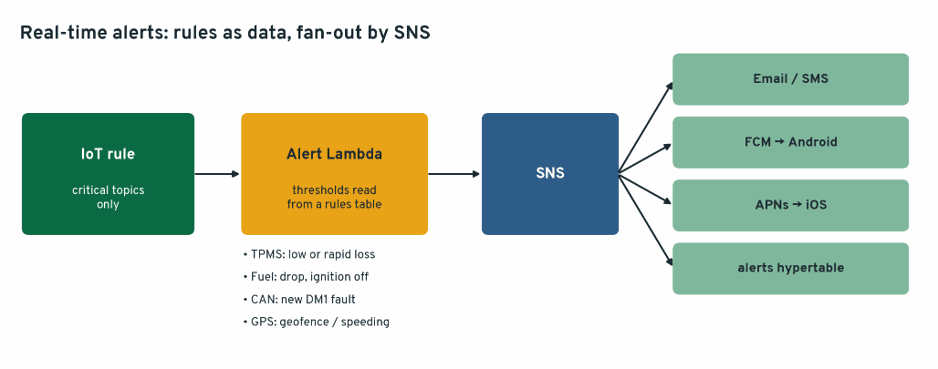
Alerts go to SNS, which fans out to email, SMS and mobile push through Firebase Cloud Messaging (Android) and APNs (iOS). Every alert is also written to an alerts hypertable, so the apps can show history and operators can acknowledge them.
Keep alert rules as data in a table, not code, so a fleet manager can change a threshold without a deployment.
7. The AI layer
AI goes where it adds something rules can’t, with SQL and rules remaining the source of truth.
Fuel theft and refuel detection. Start with SQL on the continuous aggregate, and add a model only once you have labelled events to learn from:
SELECT * FROM (
SELECT vehicle_id, bucket, ignition_on,
lag(avg_level) OVER (PARTITION BY vehicle_id ORDER BY bucket)
- avg_level AS drop_pct
FROM fuel_15m
) s
WHERE drop_pct > 8 AND NOT ignition_on;
Cross-check suspected drops against fuel-card transactions and GPS location: a “drop” 200 km from any fuel station with no card swipe is worth a call.
Predictive maintenance. Combine CAN trends (coolant temperature creeping up over weeks, rising DPF regeneration frequency), DTC history and work orders into features per vehicle, and train a model that predicts failure within N days. The model’s value is ranking which vehicles to inspect first, and its accuracy must be measured against actual repairs before anyone trusts it.
Natural-language questions. Let managers ask “which vehicles idled more than 2 hours yesterday?” using an LLM on Amazon Bedrock to write SQL, with strict guardrails:
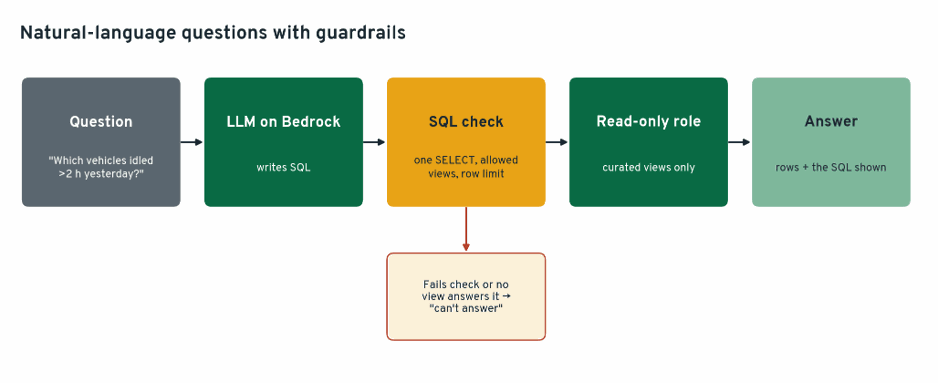
• The model’s database role is read-only and can see only curated views, never raw tables or personal data.
• Generated SQL is checked (single SELECT, allowed views only, row limit) before it runs.
• Answers show the SQL and the rows they came from, and if the question can’t be answered from the available views, the system says so instead of guessing.
Semantic search over maintenance notes. Technician notes and work orders can be embedded with pgvector in the same PostgreSQL database, so “find past repairs similar to this complaint” is one query away from the telemetry.
8. API and frontends: web, Android and iOS
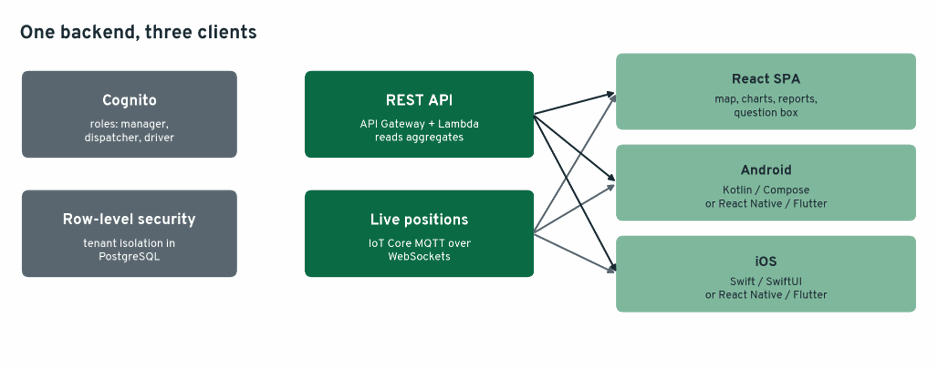
Authentication: Amazon Cognito issues tokens for all three clients, with groups for fleet managers, dispatchers and drivers. Row-level security in PostgreSQL restricts each customer to its own vehicles if you run multi-tenant.
REST API: API Gateway plus Lambda, reading from continuous aggregates and business tables (vehicles, trips, alerts, reports). Never let clients query raw hypertables directly.
Live data: For the live map, clients subscribe to IoT Core over MQTT on WebSockets using Cognito identities, with an IoT policy that allows subscribing only to the vehicles that user may see. Positions appear within about a second without polling.
Web SPA (React): Live map (Amazon Location Service or Mapbox), vehicle detail pages with sensor charts, alert inbox, trip replay, reports and the natural-language query box. The SPA is hosted on S3 with CloudFront.
Mobile apps: Two routes, depending on your team:
• Native: Kotlin (Jetpack Compose) for Android and Swift (SwiftUI) for iOS. Best performance and platform integration, at the cost of two codebases.
• Cross-platform: React Native (sharing logic with the React SPA) or Flutter. One codebase for both platforms, and the usual choice for smaller teams.
Mobile-specific needs: push notifications for alerts, offline caching (drivers and technicians lose coverage), and a driver-facing mode for pre-trip inspections and TPMS status.
9. Infrastructure as code
Everything is Terraform, including the IoT resources:
resource "aws_iot_thing" "vehicle" {
for_each = toset(var.vehicle_ids)
name = each.key
}
resource "aws_iot_topic_rule" "to_sqs" {
name = "telemetry_to_sqs"
enabled = true
sql = "SELECT *, timestamp() AS received_at FROM 'fleet/+/+'"
sql_version = "2016–03–23"
sqs {
queue_url = aws_sqs_queue.telemetry.id
role_arn = aws_iam_role.iot_rules.arn
use_base64 = false
}
}
In production, register Things through fleet provisioning rather than a static list, and keep database migrations (hypertables, aggregates, policies) in a migration tool alongside the Terraform.
10. Where the money goes
Unlike a nightly batch job, this platform has one always-on component: the database. Everything else is pay-per-use. The cost drivers to measure are:
• IoT Core messages: billed per message in 5 KB increments, so batching readings into fewer, fuller messages reduces cost directly. Basic Ingest removes the broker’s messaging charge.
• Rules Engine actions: each rule and action is metered per message, so route to as few actions as you need.
• Lambda invocations: controlled by SQS batch size and batching window.
• Database size and compute: controlled by compression, retention and continuous aggregates.
Before choosing an instance size, simulate your fleet (vehicles × sensors × reporting interval) against a test database and measure insert throughput, compression ratio and dashboard query latency. Check current AWS and Timescale pricing rather than relying on published examples.
11. Gotchas worth knowing in advance
1. Duplicates are guaranteed. At-least-once delivery at two layers means idempotent inserts are required, not optional.
2. Late data is normal. Trucks buffer data out of coverage for hours, so continuous aggregate refresh windows and alert logic must handle old timestamps arriving now.
3. Device clocks lie. Store device time and server time, and flag vehicles whose clocks drift.
4. Connection storms. Unbounded Lambda concurrency will exhaust database connections. Cap concurrency and pool connections.
5. Fuel data is noisy. Raw level readings will trigger false theft alerts on every hill. Smooth, and require the vehicle to be stationary.
6. CAN scaling errors fail silently. A wrong byte order or scale factor produces plausible-looking numbers. Validate decoded values against the dashboard gauge on a real vehicle before trusting them.
7. Unique indexes need the time column. Design idempotency keys around this hypertable rule from the start.
12. Scaling up
The design scales mostly by turning knobs: more SQS consumers, larger batches, a bigger database instance or read replicas for dashboards. When one PostgreSQL node is no longer enough, the usual next steps are separating ingest from read traffic and moving long-term analytics to Parquet in the S3 raw zone, queried with Athena.
The backbone stays the same: every message archived in S3, recent data in TimescaleDB for real-time and operational queries, and the AI layer and apps reading from curated views.
This article was originally published on Medium by Ponvannan P.